We built an anti-bot bouncer and it WORKS
Nearly half of internet traffic is bots and many come to do harm. We built a cyberdefense that stops them. And here's the real-world proof.
Summary
- The problem: nearly half of internet traffic is bots (Imperva 2025) and a big share come to steal content, crash your server, or inflate your ads.
- What we did: after months studying Cloudflare's security rules, we built a layered cyberdefense + a custom plugin that screens every visit.
- The proof: it runs on 10 real sites of ours. 10 out of 10 healthy and green, with scores from 90 to 96.
- The numbers: tens of thousands of bots filtered per site, and up to 106,700 attacking IPs pushed to Cloudflare's blacklist on a single site.
- For you: lighter hosting, recovered Google crawl budget, clean ad stats, and zero downtime from attacks. Coming soon — join the waitlist.

Every time someone lands on your site, there’s almost a 50% chance it isn’t a person. It’s a bot. And many aren’t just browsing: they come to steal your content, crash your server, inflate your ads, or hunt for your WordPress back door.
For months we studied Cloudflare’s security rules (Cloudflare is the world’s biggest proxy — a middleman that sits between the internet and your server to filter traffic) and stacked layer on layer until we had a system that stops those attacks.
Today we’ll tell you what we built, how it works, and —best of all— show you the proof: 10 out of 10 sites protected, numbers in hand.
Nearly half of the internet is bots
The number is scary: around 50% of internet traffic is automated. That’s from the Imperva Bad Bot Report 2025, a yearly report that measures bot traffic across the web. And not all of them are friendly.
Some bots you want: Googlebot, Bingbot and friends, which read your site to rank it. Keep those. But the rest is another story:
- Scrapers (bots that copy your content) that steal your listings and posts to train AIs or clone your site.
- Brute-force bots that try thousands of passwords against your
/wp-login.phpuntil they get in. - Probes hunting for sensitive files (
/.env,/wp-config.php,/.git/) to steal your keys. - XML-RPC attacks (an old WordPress door — a file that lets you post from external apps and that attackers use to amplify attacks).
- Stat inflators (bots that fake viewing your ads) that tank your AdSense RPM.
Every one of those bots your hosting serves is CPU you pay for, bandwidth you burn, and risk you run. The problem isn’t that they exist. It’s that they reach your server.
Months studying Cloudflare’s rules
Before building anything, we soaked up how Cloudflare filters. We didn’t want yet another security plugin fighting the others. We wanted a system that leverages the network that already sees one in five websites on earth.
Cloudflare’s edge is brutal: its WAF (Web Application Firewall — a smart filter that decides which requests to allow) works on its edge (its network of 300+ servers around the world), before traffic touches your hosting. If the attack stops there, your server never even notices.
We walk through it, step by step and free, in our guide Free Cloudflare: 5 anti-bot rules for WordPress. That was the base. What we did next was build on top.
What our bouncer does
Our system is a bouncer that screens every visit, one by one, and decides who gets in. It isn’t a single wall: it’s layers that cover each other.
- Cloudflare up front. Absorbs the bulk of junk traffic (network attacks, IPs already known for attacking others) before it reaches you.
- Shared blacklist. When an IP attacks one of the sites, we push it to Cloudflare’s blacklist and it’s blocked for all the others. What attacks one protects all.
- Sensitive-route blocking.
/xmlrpc.php,/.env,/wp-config.phpand friends are slammed shut. - Anti brute-force on login. We cap how many attempts per minute are accepted (rate limit) and hide the login door.
- The custom plugin. On top of it all, our own plugin screens what does get through: person or bot? real user or scraper? someone inflating your ads? Only the good ones pass.
And —this is key— the good bots still get through. Googlebot and Bingbot are on the verified list. The bouncer tells the one that indexes you from the one that attacks you.
The proof: 10 of 10 sites, and the numbers
Here’s what we’d been waiting months to show. This is the real, live security panel of our fleet:
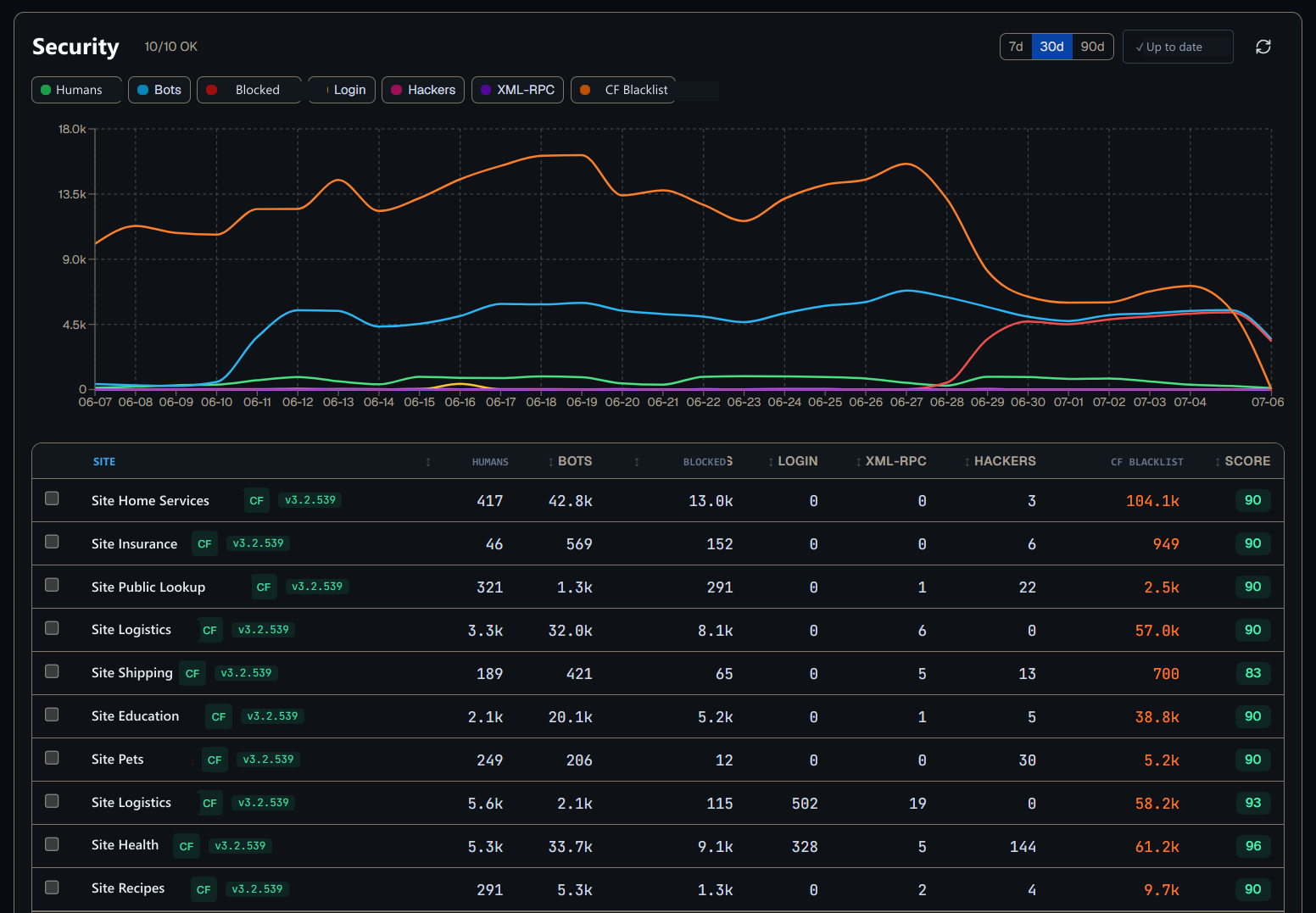
Read it left to right:
- 10/10 OK at the top: all ten sites green and healthy.
- The chart covers 30 days. The orange line (CF Blacklist) is the volume of attacking IPs pushed to the blacklist: it rises, holds, and drops at the end — because the more bad IPs you block, the fewer come back to try again.
- The table counts what matters, per site:
| Column | What it means |
|---|---|
| Humans | Real visits from people |
| Bots | Bots detected (good and bad) |
| Blocked | Requests the bouncer cut off |
| CF Blacklist | Attacking IPs pushed to Cloudflare’s blacklist |
| Score | Site security health score (0-100) |
The numbers speak for themselves. A single site reached 106,700 attacking IPs on the blacklist. Another filtered 40,300 bots while letting through only 411 real people — meaning 99% of what knocked on its door was automated. And still, every site holds a score of 90 to 96.
No site went down. None served those attacks with its own CPU. The bouncer works.
What these numbers mean for you
Translated to your day-to-day, here’s what a bouncer like this saves you:
- Lighter hosting. Your server stops burning CPU and memory serving bots. It handles more real visits on the same plan.
- Recovered crawl budget. Google gives you a crawl budget (the daily visit allowance it dedicates to you). If bad bots eat it, Googlebot reaches your new content late. We explain it in why Google doesn’t index you.
- Clean ad stats. Fewer bots inflating your impressions = an AdSense RPM that reflects real people.
- Zero attack downtime. Malicious traffic spikes stop at the edge, not on your site.
- Smaller attack surface. Closing
/xmlrpc.phpand protecting login cuts the most common vectors. If you also use application passwords, check Application Passwords: pros and risks.
Wrap: it works, and it’s coming soon
We spent months experimenting, breaking things, and measuring. Today we can say it with the proof in front of us: we built an anti-bot bouncer and it works. It runs in production, across our ten sites, stopping attacks every day.
Now we’re polishing it to fold into WPO Toolkit and open it to everyone. If you want that bouncer watching your WordPress —speed, performance, and security in one tool— join the waitlist: the first 500 get 50% off for the first 3 months.
Questions, or want to tell us your case? Write to [email protected]. A person replies, not a bot.
— The SeoNova team
Frequently asked questions
The questions we hear the most about this topic
What percentage of internet traffic is bots?
Does this system block Google and Bing?
Do I need Cloudflare to use your bouncer?
Does this filter slow my site down?
When can I use it on my WordPress?
Keep reading
More posts you might like
- WPO Toolkit
What Cloudflare does for your website (and when the Pro plan is worth paying for)
Plain-English guide: what Cloudflare is, what the free plan gives you, when the $20 Pro plan is worth it, and how it protects WordPress from bots.
6 min read - WPO Toolkit
Free Cloudflare: how to set it up and 5 WAF anti-bot rules for your WordPress
Why free Cloudflare is brutal, how to set it up step by step, and 5 WAF rules that block 60-70% of malicious bots without paying a cent.
9 min read - WPO Toolkit
WordPress + Cloudflare: the cache purge order nobody explains
How to purge 5 cache layers in WordPress (OPcache, Object Cache, WP Rocket, LiteSpeed, Cloudflare) without serving stale content. Exact order.
9 min read